Skip to content
Oryx.
Digital Transformation

Better systems. More possibilities.

Explore the overview
New enquiryWebsite formSales handoffLead ownerRequest capturedReady to follow upEvery enquiry gets a clear next step.
AI assistants · Connected workflows
AI & AutomationPut repetitive work on a smarter path.
Pipeline · Sales · Follow-upOdoo CRMKeep opportunities and follow-ups connected.Microsoft 365 · Power Platform · CopilotMicrosoft SolutionsHelp your team work better together.
Websites & AppsDigital MarketingHosting & Support
العربيةStart a project
Digital Transformation / MicrosoftMicrosoft services, delivered by Oryx

Microsoft 365.
Built around your team.

Business email, shared files and everyday collaboration, set up for the way you work. Oryx plans your migration, configures access and helps your team make practical use of automation and AI.

Discuss your Microsoft project ↗Explore our services ↓
Planning · Implementation · Adoption · Support
Your Microsoft workplaceEverything connects.
Your team
Exchange OnlineBusiness email
SharePointShared knowledge
Power AutomateConnected workflows
Copilot StudioPractical AI
Built around your people, processes and permissions.Illustrative solution architecture by Oryx
From scattered files to shared knowledge

The right file. The right people.

Give your team one place to work from, with a clear structure and access that matches each person’s role.
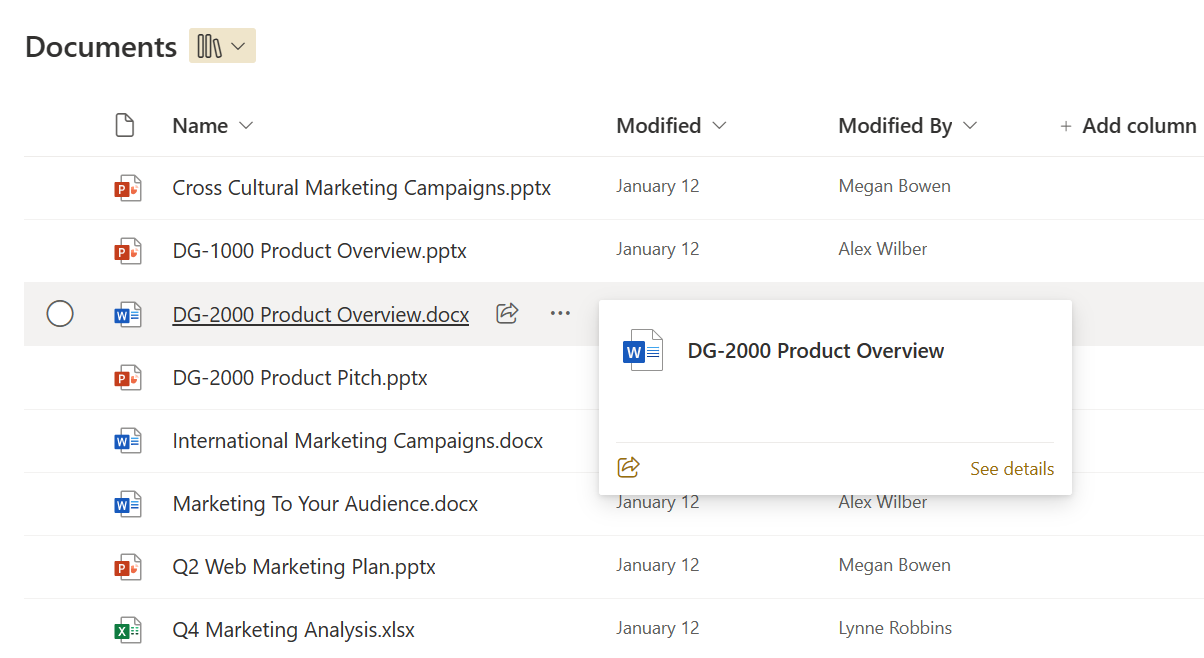
  • Organise documents around your projects and teams.
  • Agree who can view, edit and share.
  • Prepare approved content for future AI workflows.
Explore setup and migration ↓
Microsoft SharePointProduct view
Microsoft SharePoint document library showing shared files and their editors
Microsoft product exampleUsed with permission from Microsoft.
Start where you need us

What does your team
need next?

One project or ongoing support. We agree the scope, responsibilities and success criteria before work begins.

Stock photograph of a business discussion with a laptop
Built around real workThe right tools. A team ready to use them.

Microsoft 365 setup & access

+

Choose a Microsoft 365 setup around your people, devices and everyday work.

Licence planning · Tenant setup · AccessDiscuss this service ↗

Email & data migration

+

Map mailboxes, domains and dependencies before migration. Agree the cutover, checks and recovery steps together.

Email migration · Domain setup · HandoverDiscuss this service ↗

Power Automate workflows

+

Connect requests, approvals and records with Power Automate. Give each workflow a clear owner and an exception path.

Approvals · Notifications · IntegrationsDiscuss this service ↗

Copilot readiness & pilots

+

Identify useful Copilot scenarios, review data access and test a focused pilot with your team before wider adoption.

Readiness · A focused pilot · Team adoptionDiscuss this service ↗

Administration & team support

+

Define administration, user onboarding, support and handover responsibilities in an agreed service plan.

Administration · Training · Ongoing careDiscuss this service ↗
See how the pieces connect

Put your Microsoft tools
to work together.

Explore three illustrative workflows. Your implementation starts with your process, data and licence requirements.

A request with somewhere to go.

A team member submits a request. The right person reviews it, and the decision is recorded where the team can find it.
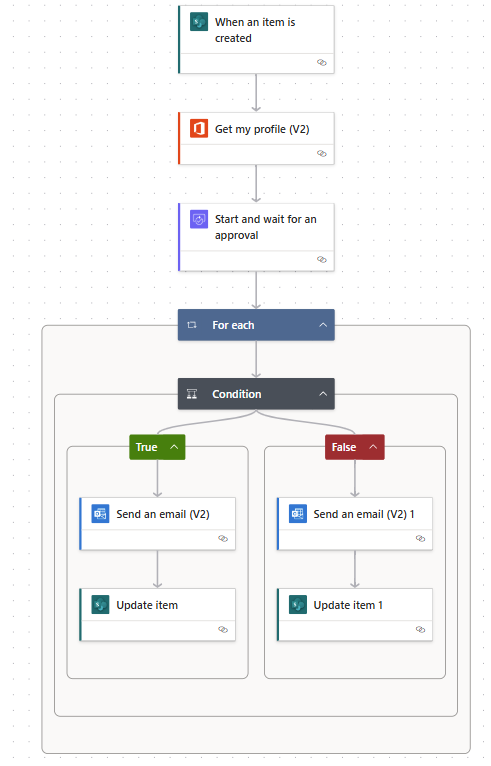
Microsoft Power AutomateProduct view
Microsoft Power Automate approval flow with separate approved and rejected paths, email notifications and record updates
Microsoft product exampleUsed with permission from Microsoft.
Illustrative solution architecture
Microsoft TeamsSubmit a request
Power AutomateRoute for approval
SharePointKeep the record

Oryx defines the approval rules, access and exception handling.

A clear path to handover

Technology your team
can take ownership of.

Understand

Review your tools, users and the work you want to improve.

Plan

Agree the scope, licences, access rules and migration approach.

Implement

Configure, test and introduce the solution with your team.

Hand over & support

Document the setup, train owners and agree ongoing care.

Before we begin

A few practical questions.

Scope, costs and the work involved. Here’s what to expect.

Can you review our existing Microsoft setup?+

Yes. We can begin with your current tenant, licence needs, access and workflows, then agree what to improve.

Are licences included in the project?+

We identify licence requirements during planning. Product subscriptions, procurement arrangements and Oryx service fees are confirmed separately in the proposal.

Where should we start with AI?+

Start with a specific task and a small pilot. We review data access, licensing, expected results and human oversight before recommending wider use.

Your next step

Let’s plan your Microsoft project.

Moving your email, improving an existing setup or introducing automation? Tell us what your team needs to do next.

Discuss my Microsoft project ↗
A useful first conversation

Tell us about your work.

  • ↗Your current email and Microsoft setup
  • ↗Who needs access and how they work
  • ↗Your migration or improvement priorities

We clarify the scope, responsibilities and next steps with you before implementation.

Part of a bigger project?AI & Automation ↗Odoo CRM ↗

Microsoft, Microsoft 365, Microsoft Teams, SharePoint, Power Automate, Microsoft Copilot Studio, Exchange Online and Dataverse are trademarks of the Microsoft group of companies. Oryx provides the services described on this page.

Oryx.

Transformation, done properly.

info@oryxlab.comWhatsApp

Explore

Digital TransformationWebsites & AppsDigital MarketingHosting & SupportAI & AutomationOdooMicrosoft 365

Oryx

WorkAboutContactSupportReferrals

Details

PrivacyTerms

Cairo, Egypt. Working everywhere.

© 2026 Oryx Lab LLC